<?xml version="1.0" encoding="utf-8"?>
<feed xmlns="http://www.w3.org/2005/Atom">
  <id>https://blog.lenmei233.top/</id>
  <title type="text">lenmei233&apos;s Blog</title>
  <subtitle type="text">技术分享与日常记录</subtitle>
  <updated>2026-11-01T00:00:00.000Z</updated>
  <author><name>lenmei233</name></author>
  <link rel="alternate" href="https://blog.lenmei233.top/"/>
  <link rel="self" href="https://blog.lenmei233.top/atom.xml"/>
  <generator uri="https://github.com/CuteLeaf/Firefly">Firefly v6.16.9</generator>
    <entry>
      <id>https://blog.lenmei233.top/posts/hello-obsidian/</id>
      <title type="text">Hello Obsidian : 使用Obsidian重构码字体验</title>
      <published>2026-11-01T00:00:00.000Z</published>
      <updated>2026-11-01T00:00:00.000Z</updated>
      <author><name>lenmei233</name></author>
      <link rel="alternate" href="https://blog.lenmei233.top/posts/hello-obsidian/"/>
      <summary type="text">小站的内容方式编写全面换成Obsidian了，记录一下成果</summary>
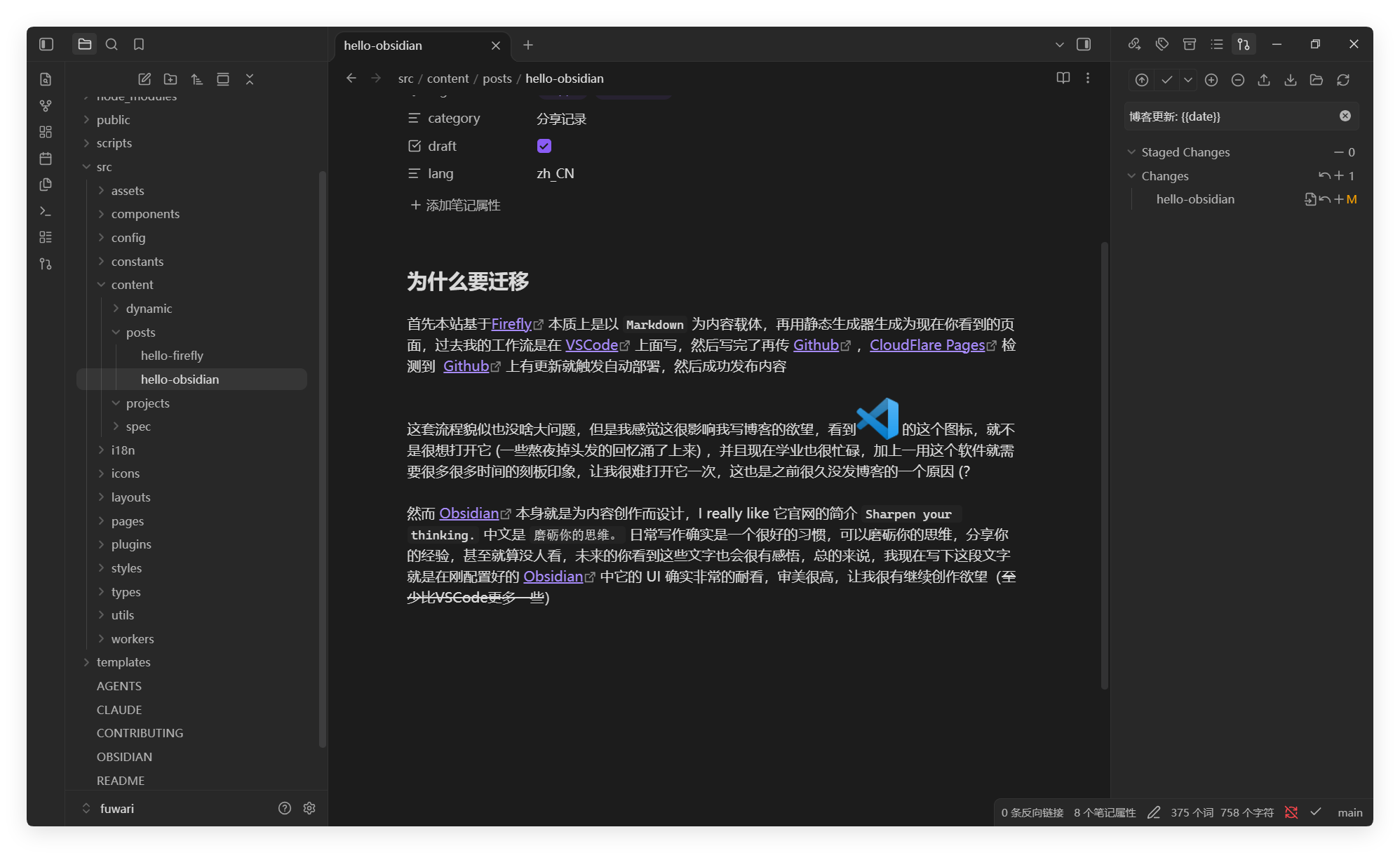
      <content type="html"><![CDATA[<section><h2>为什么要迁移<a href="#为什么要迁移"><span>#</span></a></h2><p>首先本站基于<a href="https://github.com/CuteLeaf/Firefly" target="_blank">Firefly</a> 本质上是以 <code>Markdown</code> 为内容载体，再用静态生成器生成为现在你看到的页面，过去我的工作流是在 <a href="https://code.visualstudio.com/" target="_blank">VSCode</a> 上面写，然后写完了再传 <a href="https://github.com/" target="_blank">Github</a> ，<a href="https://www.cloudflare.com/products/pages/" target="_blank">CloudFlare Pages</a> 检测到  <a href="https://github.com/" target="_blank">Github</a> 上有更新就触发自动部署，然后成功发布内容</p><p>这套流程貌似也没啥大问题，但是我感觉这很影响我写博客的欲望，看到<img src="/images/vscode.png" alt="" /> 这个图标，就不是很想打开它 (一些熬夜掉头发的回忆涌了上来) ，并且现在学业也很忙碌，加上一用这个软件就需要很多很多时间的刻板印象，让我很难打开它一次，这也是之前很久没发博客的一个原因 (？</p><p>然而 <a href="https://obsidian.md/" target="_blank">Obsidian</a> 本身就是为内容创作而设计，I really like 它官网的简介 <code>Sharpen your thinking.</code> 中文是 <code>磨砺你的思维。</code> 日常写作确实是一个很好的习惯，可以磨砺你的思维，分享你的经验，甚至就算没人看，未来的你看到这些文字也会很有感悟，总的来说，我现在写下这段文字就是在刚配置好的 <a href="https://obsidian.md" target="_blank">Obsidian</a> 中它的 UI 确实非常的耐看，审美很高，让我很有继续创作欲望（至少比VSCode更多一些）</p><p><img src="/images/%E5%9C%A8Obsidian%E4%B8%AD%E5%86%99%E4%BD%9C.png" alt="" /></p></section>
<section><h2>现在的工作流<a href="#现在的工作流"><span>#</span></a></h2><ul>
<li>闲的没事看看到桌面上有一个<code>紫色石头</code> <img src="/images/obsidian.png" alt="" /> 是黑曜石啊喂!</li>
<li>打开直接创建一个空白笔记</li>
<li>插入配置好的模板 (包括了所有笔记属性)</li>
<li>直接写下所想所感，图片直接粘贴改名(全部由自制插件内联转化，再也不用和VSCode时期一样手动改了)</li>
<li>写完保存，推送Git，如上图右边</li>
<li>自动部署到 CloudFlare 全球网络</li>
<li>你看到了这篇博文</li>
</ul></section>]]></content>
    </entry>
    <entry>
      <id>https://blog.lenmei233.top/posts/hello-firefly/</id>
      <title type="text">Hello Firefly：小站迁移与新的开始</title>
      <published>2026-10-31T00:00:00.000Z</published>
      <updated>2026-10-31T00:00:00.000Z</updated>
      <author><name>lenmei233</name></author>
      <link rel="alternate" href="https://blog.lenmei233.top/posts/hello-firefly/"/>
      <summary type="text">小站从 Fuwari 迁移到了 Firefly 主题，文章全部清零重来。记录这次迁移保留了什么、换上了什么，以及为什么想有个新的开始。</summary>
      <content type="html"><![CDATA[<div><div><span></span><span>AI 总结</span></div><div><p>作者把博客从 Fuwari 整体迁移到了基于它二次开发的主题 Firefly，并清空了全部旧文章重新出发。迁移中保留了 Cloudflare KV 访问量统计（文章页 / 卡片 / 侧栏三处显示）、AI 总结块、友链页、Waline 评论和页脚备案信息；同时换上了 Firefly 自带的分类导航、沉浸阅读、文章封面横幅、OG 图生成等功能。旧文章没有丢，都留在 git 历史里，随时可以找回。</p></div><div><span>glm-5.3-flash</span><span>更新于 2026-10-31</span></div></div>
<section><h2>为什么要迁移<a href="#为什么要迁移"><span>#</span></a></h2><p><a href="https://github.com/saicaca/fuwari" target="_blank">Fuwari</a> 是个很好的主题，小站从搭起来到现在一直是它在驱动。不过用久了总想换个样子，正好发现了 <a href="https://github.com/CuteLeaf/Firefly" target="_blank">Firefly</a>——一个基于 Fuwari 二次开发的主题，设计更现代，功能也丰富得多，迁移成本还低，那就没什么好犹豫的。</p><p>至于把文章全部清掉，纯粹是想给这个博客一个<strong>新的开始</strong>。之前写的东西大多是折腾记录，回头看价值不大，与其让它们继续挂在首页上，不如让小站轻装上阵。旧文章并没有丢——它们都在 git 历史里，哪天想找回来随时可以。</p></section>
<section><h2>迁移保留了什么<a href="#迁移保留了什么"><span>#</span></a></h2><p>换主题最怕的就是功能丢失，这次特意把每个自定义功能都搬了过去：</p><ul>
<li><strong>访问量统计</strong>：还是 Cloudflare Pages Functions + KV 那一套（<code>/api/views</code>），KV 绑定和已有数据原封不动。文章页、首页卡片、侧边栏三处的显示也都接好了，你的每一次访问依然被记着。</li>
<li><strong>AI 总结块</strong>：<code>:::ai-summary</code> 指令、流式播放效果、模型脚注，整套移植，连样式都尽量保持原样。</li>
<li><strong>友链页</strong>：15 个朋友的链接一个不少，申请方式依旧是提 PR。</li>
<li><strong>Waline 评论</strong> 和页脚的备案号、统计脚本，都还在原来的位置。</li>
</ul></section>
<section><h2>换上了什么<a href="#换上了什么"><span>#</span></a></h2><p>Firefly 自带的好东西这次都打开了：</p><ul>
<li>首页顶部的<strong>分类快捷导航</strong></li>
<li>文章页的<strong>封面横幅</strong>和<strong>沉浸阅读</strong>模式</li>
<li>每篇文章自动生成的 <strong>OG 分享图</strong></li>
<li><strong>相关文章 / 随机推荐</strong>、更漂亮的代码块和目录</li>
</ul><a href="https://github.com/CuteLeaf/Firefly" target="_blank"><div><div><div><div></div><div>CuteLeaf</div></div><div>/</div><div>Firefly</div></div><div></div></div><div>🍀Firefly, fresh and aesthetic Astro blog theme template. </div><div><div>—</div><div>—</div><div>MIT</div><span>Astro</span></div></a></section>
<section><h2>接下来<a href="#接下来"><span>#</span></a></h2><p>仓库也搬了新家：<a href="https://github.com/lenmei233/blog-new" target="_blank">lenmei233/blog-new</a>。之后会在这里写点新的东西——也许是折腾记录，也许不是。总之，新的开始，请多指教。</p></section>]]></content>
    </entry>
</feed>